Popup galleries tutorial 4.4.12
1) starting point: buttons are on the stage
1b) make sure the stage properties are set: width and height big enough (my example file has 700 x 450 )
2) make new layer for actions
3) insert code to frame 1
  var popupmc:GalleryPopUp = new GalleryPopUp();

photo_btn.addEventListener(MouseEvent.CLICK, onPhotoButtonClick);

function onPhotoButtonClick(event:MouseEvent):void
{
	//trace("Jees button works!")
	addChild(popupmc);
	popupmc.title_text.text ="Photos";
	popupmc.x = 30;
	popupmc.y = 15;
}
3b) make sure one of the buttons have instance name photo_btn
4) make gallery popup window:
4a) insert > new symbol
4b) make sure its a movieclip type
4c) give name: GalleryPopUp
4d) select export for actionscript:
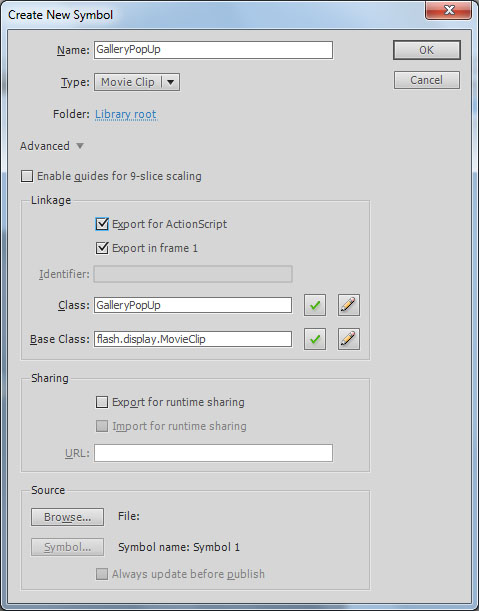
4f) click ok
4g) on the gallerypopup movieclip create the following:
i) background graphics
at this point you might test if the above code works
ii) close button
iii) left and right buttons for browsing images on the popup gallery: instance names: left_button, right_btn
iv) text fields with the following instance names
iv.1) title_text
iv.2) messageBox
v) an empty movieclip as an image placeholder and place it in the stage with instance name:placeHolder_mc
v.1) Insert > new symbol
v.2) place new empty movieclip from library to stage, give instance name:placeHolder_mc
v.3) place file called ImageLoad4.as (from S:\flash basics 2012\lesson05) into same folder as your flash project
example file at this point S:\flash basics 2012\lesson06\popupgalleries01.fla
5) create class file for GalleryPopUp (filename GalleryPopUp.as):
package
{
	import flash.display.MovieClip;
	import flash.events.MouseEvent;
	public class GalleryPopUp extends MovieClip
	{

		var index:int = 0;// uint: unsigned integer
		var imageFileNames:Array = ["IMG_0026.JPG","DSC04634.JPG","DSC05283.JPG","DSC05289.JPG","DSC06583.JPG","DSC06807.JPG"];
		var imageLoad:ImageLoad4;
		var folder:String = "photography"; // floder name for the pics

		public function GalleryPopUp()
		{
			// constructor code
			imageLoad = new ImageLoad4();
			placeHolder_mc.addChild(imageLoad);
			close_btn.addEventListener(MouseEvent.CLICK, onCloseButtonClick);
			right_btn.addEventListener(MouseEvent.CLICK, onRightButtonClick);
			left_button.addEventListener(MouseEvent.CLICK, onLeftButtonClick);
			imageLoad.loadImage(folder + "/" + imageFileNames[index]);
		}

		function onRightButtonClick(event:MouseEvent):void
		{
			index = index + 1;
			if (index > imageFileNames.length-1)
			{
				index = 0;
			}
			imageLoad.loadImage(folder + "/" + imageFileNames[index]);
			messageBox.text = "index " + index + " and image name " + imageFileNames[index];

		}

		function onLeftButtonClick(event:MouseEvent):void
		{
			index = index - 1;
			if (index < 0 )
			{
				index = imageFileNames.length - 1;
			}
			imageLoad.loadImage(folder + "/" + imageFileNames[index]);
			messageBox.text = "index " + index + " and image name " + imageFileNames[index];

		}
		function onCloseButtonClick(event:MouseEvent):void
		{
			//trace("Jees button works!")
			parent.removeChild(this);
		}
	}
}
example file at this point S:\flash basics 2012\lesson06\popupgalleries02.fla
6) second button and popupgallery:
6b) create another button and give it instance name (mediaart_btn in the example)
6c) create new code in frame 1 (copy paste to duplicate and change the bolded code (here just the added code):
var mediapopupmc:MediaArtGalleryPopup = new MediaArtGalleryPopup();
mediaart_btn.addEventListener(MouseEvent.CLICK, onMediaArtButtonClick);

function onMediaArtButtonClick(event:MouseEvent):void
{
	//trace("Jees button works!")
	addChild(mediapopupmc);
	mediapopupmc.title_text.text ="Media-art";
	mediapopupmc.x = 30;
	mediapopupmc.y = 15;
}

6d) duplicate GalleryPopUp movieclip
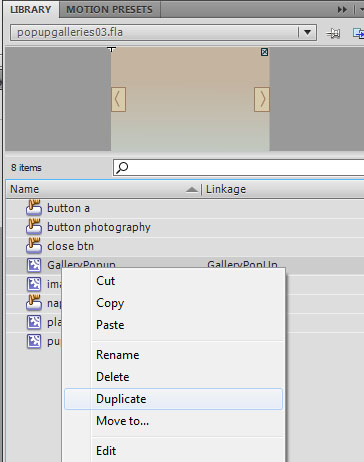
6e) rename the movieclip and select export for actionscript:
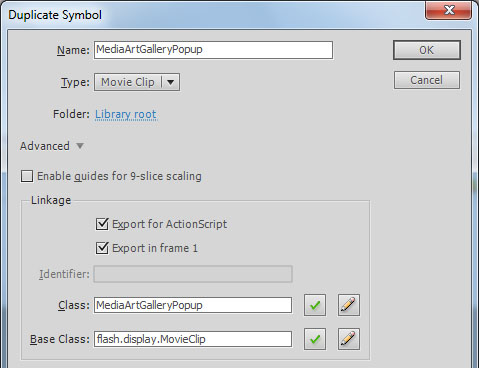
6f) make a new class file: duplicate GalleryPopUp.as and rename it (MediaArtGalleryPopup in the example)
edit the contents: (bolded)
package
{
	import flash.display.MovieClip;
	import flash.events.MouseEvent;
	public class MediaArtGalleryPopup extends MovieClip
	{

		var index:int = 0;// uint: unsigned integer
		var imageFileNames:Array = ["pcspintro2.jpg","pcsdkmstit.jpg","ifxskompositio.jpg","gonfiabilekompos.jpg","ifxs.jpg"];
		var imageLoad:ImageLoad4;
		var folder:String = "mediaart"; // floder name for the pics

		public function MediaArtGalleryPopup()
		{
			// constructor code
			imageLoad = new ImageLoad4();
			placeHolder_mc.addChild(imageLoad);
			close_btn.addEventListener(MouseEvent.CLICK, onCloseButtonClick);
			right_btn.addEventListener(MouseEvent.CLICK, onRightButtonClick);
			left_button.addEventListener(MouseEvent.CLICK, onLeftButtonClick);
			imageLoad.loadImage(folder + "/" + imageFileNames[index]);
		}

		function onRightButtonClick(event:MouseEvent):void
		{
			index = index + 1;
			if (index > imageFileNames.length-1)
			{
				index = 0;
			}
			imageLoad.loadImage(folder + "/" + imageFileNames[index]);
			messageBox.text = "index " + index + " and image name " + imageFileNames[index];

		}

		function onLeftButtonClick(event:MouseEvent):void
		{
			index = index - 1;
			if (index < 0 )
			{
				index = imageFileNames.length - 1;
			}
			imageLoad.loadImage(folder + "/" + imageFileNames[index]);
			messageBox.text = "index " + index + " and image name " + imageFileNames[index];

		}
		function onCloseButtonClick(event:MouseEvent):void
		{
			//trace("Jees button works!")
			parent.removeChild(this);
		}
	}
}
example file at this point S:\flash basics 2012\lesson06\popupgalleries03.fla
Links